

Elected Executive Committee member can nominate himself for an Office. Member can nominate himself for one post only out of 5 posts.
Office Bearer Posts
President
Vice President
Secretary
Joint Secretary
Treasurer
1 Post
1 Post
1 Post
1 Post
1 Post
Submit Nomination

Before you can access the EC Office Bearer Nominations, make sure you have logged on on the AMPI Website. After logging the AMPI website, member may find the link Apply for EC OB. Click on the link to submit your nomination for EC OB post.
Now the webpage ‘Apply Nomination for EC Office Bearers’ is launched.
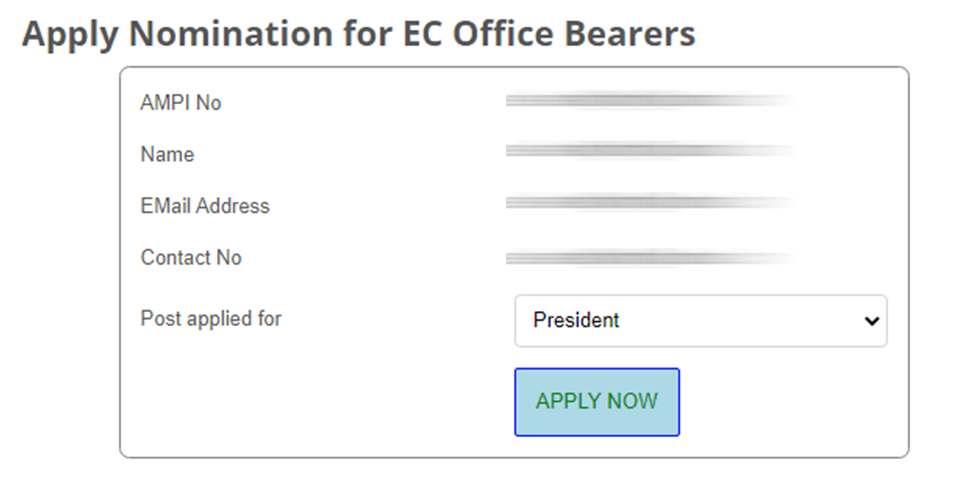
The nomination form comes pre-filled with your details. Just in case you want to change the email address or contact number, please update in the Update Profile page and visit again.
Now select the post you want to send nomination for and click on the APPLY NOW button. Your nomination will be submitted after a positive confirmation.
Kindly note one member can apply for one post only and subjected to scrutiny and approval by the Election Officer.
Withdrawing Nomination
Just incase your wish to withdraw your nomination, you can do so before the Date for Nominations Withdraw. Visit Apply for EC OB and you will be taken to the Nominations page but with a WITHDRAW button in place of APPLY NOW button.
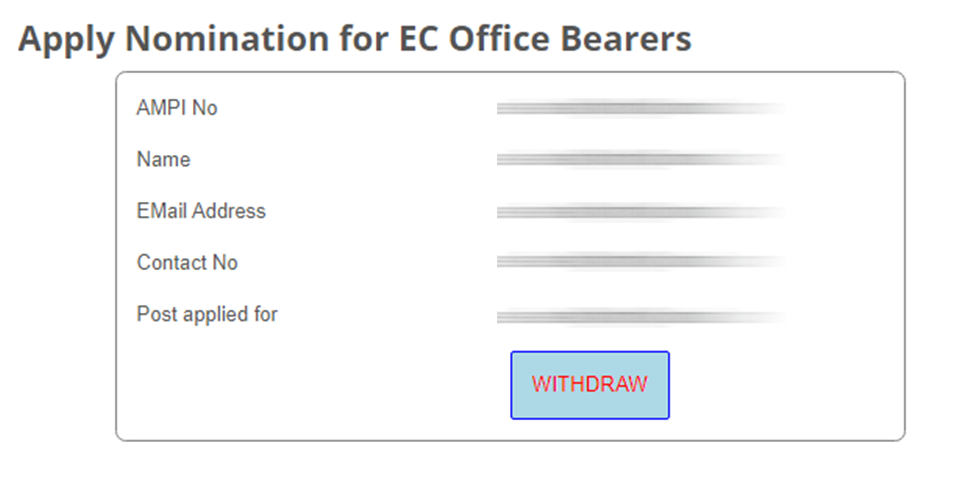
Now click on WITHDRAW button to withdraw your nomination.
Nominations Status
Members can view the Provisional and Final List of nominations after the last date for nomination submission, and date of declaration of final list as per the EC OB Elections announcement.
Click on View EC OB Candidates to see the list of Nominations and their status.
For more information and clarification the member may write to Election Officer eo@ampi.org.in